The short answer
Quick answer: renewal should run on its own.
An SSL certificate, also called an SSL/TLS certificate, lets browsers open your site over a secure HTTPS connection. A certificate authority (CA) is the organization that issues it. Each certificate has an end date.
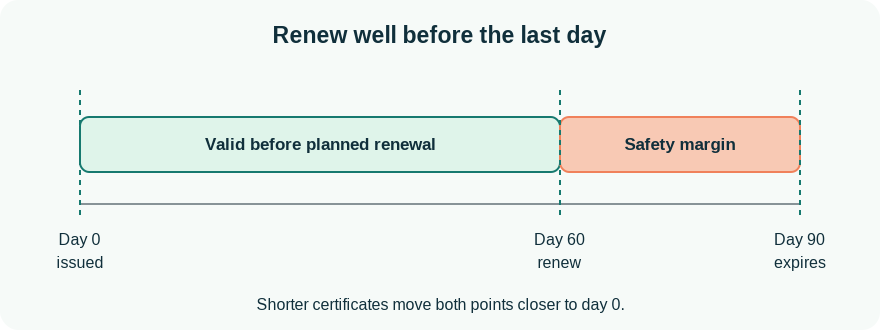
Let’s Encrypt, a free CA, says a standard certificate from it lasts 90 days. It recommends renewing them every 60 days. Renewing early leaves time to fix a problem before the certificate runs out. Let software do the renewing, not a note in your calendar.
What is changing
Certificates are getting shorter.
The CA/Browser Forum sets rules that public CAs must follow. In 2025 it adopted a ballot that lowers the maximum certificate lifetime in steps, from 398 days to 47 days. The steps start in March 2026 and end in March 2029.
Let’s Encrypt has published its own timeline. From February 10, 2027, its default profile issues 64-day certificates. From February 16, 2028, that becomes 45 days. You will see the shorter lifetime at your next renewal after those dates.
Let’s Encrypt says most users who renew automatically do not need to change anything, but they should check that their automation can handle shorter certificates. It also warns that a fixed 60-day renewal schedule will no longer work with 45-day certificates. It also advises against renewing by hand.
Find the owner
Who renews your certificate?
There are two common setups. Find out which one you have before something goes wrong.
- Your hosting provider does it. Let’s Encrypt says many hosts get and manage its certificates for their customers. That happens automatically, or after you switch on an option. Check your host’s documentation or control panel.
- You run the software yourself. If your host does not manage certificates and you want a Let’s Encrypt certificate, you need an ACME client and the rights to run it on your server. ACME is the protocol Let’s Encrypt uses to issue certificates. Let’s Encrypt recommends Certbot for most people.
The Certbot documentation says most installations renew automatically. Certificates made with its manual plugin are the exception: they do not renew on their own unless you add hook scripts.
Look at the date
Check when your certificate expires.
On a host that manages certificates, the control panel or the host’s documentation is the place to look. On your own server with Certbot, these commands help:
certbot certificatesshows each certificate Certbot manages, with its domains, expiry date and the number of days left.certbot renew --dry-runruns a test renewal and does not save any certificates. It uses Let’s Encrypt’s staging (test) server, unless you have set a different server in Certbot. Certbot warns that a dry run with a different server may create real certificates that are then thrown away.
Since version 4.0.0, Certbot treats a certificate as ready for renewal when less than one third of its lifetime is left. For certificates that last 10 days or less, the point is one half. Before version 4.0.0, it used a fixed 30 days. Certbot says you can run certbot renew as often as you like, because it only renews certificates that are close to expiry.
Also check the domain list. One certificate can cover several names, such as example.com and www.example.com. A name that is missing from the list is not covered by that certificate.
Do not rely on email
Do not wait for a reminder email.
Let’s Encrypt stopped sending expiration notification emails on June 4, 2025. If renewal breaks, nobody from Let’s Encrypt will warn you.
A certificate monitoring service can send you an alert before a certificate expires. Let’s Encrypt keeps a list of monitoring services. It says those services are not affiliated with it and that it does not endorse them. Compare the options yourself.
Browser warnings
Why your site says “Not secure”.
Chrome shows “Not secure” when a site does not use a private connection. Google says the site owner must fix this by securing the site with HTTPS.
A full-page “Your connection is not private” error is different. Google says the cause can lie with the site, the network or the visitor’s device. If visitors report it on your site, a good first check is your certificate: its expiry date and the domain names it covers.
A valid certificate does not fix every warning. “Mixed content” means an HTTPS page loads files, such as images or scripts, over plain HTTP. According to MDN, browsers switch images, video and audio to HTTPS on their own and block most other insecure files, such as scripts. Blocked files can stop parts of the page from working.
The fix is to serve everything over HTTPS. Use HTTPS or relative links for files on your own domain, and HTTPS versions of files from other sites. Your browser’s developer console shows a warning for each file it upgrades or blocks.
Fix the cause
If renewal failed.
A new certificate only helps if the cause of the failure is fixed. Work through these checks:
- On managed hosting, check that the certificate option is still switched on for this domain. If it is, ask your host for help.
- On your own server, run
certbot renew --dry-runand read the error it reports. - Let’s Encrypt checks that you control each name on the certificate. With HTTP-01, the most common check, it must be able to fetch a special file through each name, including www. If you use more than one web server, that file must be available on all of them.
- After a move to a new host, see HTTPS on the new host and DNS propagation.
Sources and limits
Check the sources.
- Let’s Encrypt: FAQ
- Let’s Encrypt: ending expiration notification emails
- Let’s Encrypt: decreasing certificate lifetimes to 45 days
- CA/Browser Forum: ballot SC-081v3
- MDN: mixed content
- Google Chrome Help: check if a site’s connection is secure
- Let’s Encrypt: getting started
- Let’s Encrypt: monitoring service options
- Certbot: user guide
- Let’s Encrypt: challenge types
Sources checked November 25, 2026. Lifetimes, renewal rules and control panels differ by certificate authority and host. We have not tested renewal on any host ourselves.
Straight answers
Questions about SSL certificate renewal.
How long is an SSL certificate valid?
It depends on the certificate authority. A standard Let’s Encrypt certificate lasts 90 days today. Let’s Encrypt plans to move to 45 days by 2028, and the industry maximum is also going down.
Do I need to renew my SSL certificate myself?
Often not. Many hosting providers get and renew certificates for you, sometimes after you switch on a setting. If you run your own server, an ACME client such as Certbot can renew on a schedule.
What happens when an SSL certificate expires?
The certificate is no longer valid, so browsers can show a warning instead of your page. Renew it, then open the site over HTTPS again to check. Monitoring helps you notice the next problem in time.
Is a free SSL certificate good enough?
Let’s Encrypt certificates are free and trusted by most browsers, according to Let’s Encrypt. They are Domain Validation (DV) certificates: Let’s Encrypt checks that you control the domain. Let’s Encrypt offers only this type. If you need a different validation type, you need another certificate authority. Some hosts charge a small fee to set up a Let’s Encrypt certificate.