The short answer
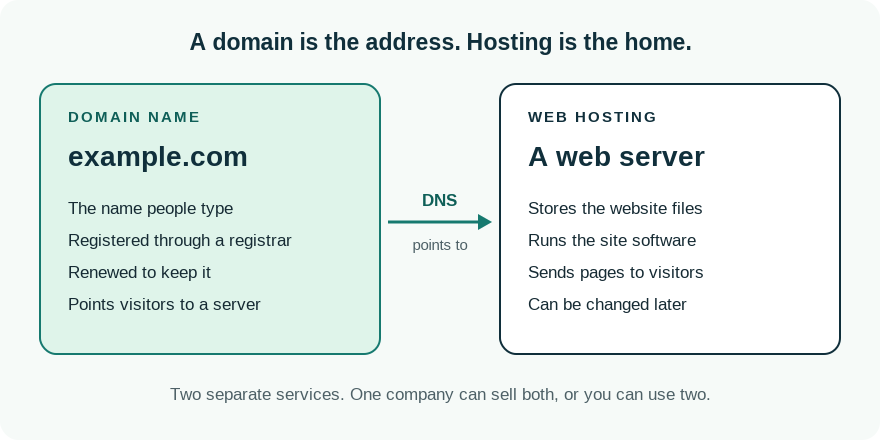
The domain is the address. Hosting is the home.
Domain name
The name people type to reach you, like example.com. You register it through a registrar and renew it to keep it.
Web hosting
A server that stores your site files and sends pages to visitors. Without it, the address has nothing to show.
The domain points to the hosting through DNS settings. DNS is the system that turns a name into a server address. You can keep the domain at one company and the hosting at another.
Registering a domain
What you get when you register a domain.
You do not buy a domain forever. You register it for a period, and you renew it before it runs out. The person or business that holds the rights to the name is called the registrant. Three roles come up along the way:
Registrar
The company that registers the domain for you. ICANN accredits registrars. Your agreement with the registrar sets the fees, renewals and transfer terms.
Registry
The organization that runs one ending, such as .com. That ending is called a top-level domain. The registry keeps its database and publishes where each domain points.
Reseller
A company that sells domains through a registrar. It may also sell other services, such as web hosting. ICANN does not accredit resellers, but the registrar stays responsible for the registrar services they provide.
The rules below come from ICANN, the body that accredits registrars for endings such as .com. Country endings, such as .uk, are generally registered through their own country code operators.
Your rights as a registrant
You may read your registration agreement at any time and keep a copy. You are also entitled to clear information about who your registrar is, its prices and terms, and its customer support. It must also explain how it registers, renews, transfers and restores domains. ICANN says registrars must not use false advertising, hidden fees or deceptive notices.
Your duties as a registrant
- Give accurate contact details, and update them when they change.
- Respond to questions from your registrar within 15 days.
- Keep your account details current. If the domain renews automatically, keep your payment details current too.
- Read the registrar’s agreement and any updates to it.
Hosting
What web hosting does.
Hosting gives your website a place to live. Your pages, images and code sit on a server. When someone visits, that server sends the files to their browser.
There are several kinds of hosting, from shared plans to a whole server of your own. Our guide to the types of web hosting explains each one in plain words.
Some website builders include hosting in the plan. Then you may not need a separate host at all. See website builder vs web hosting to check which setup you have.
The domain and the hosting can each have their own price and renewal date. The guide on how much web hosting costs shows how to put both in one budget.
The link between them
How a domain points to your hosting.
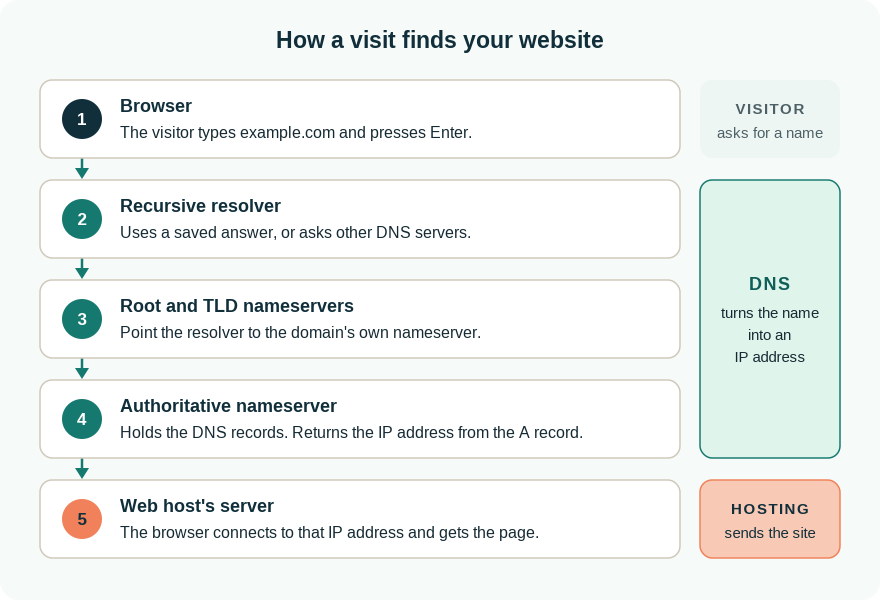
The link is made by DNS, the Domain Name System. Computers find each other by IP address, a number such as 192.0.2.10. DNS turns your easy name into that number.
When someone types your domain, a recursive resolver gets the question first. This DNS server may already have a saved answer. If not, it asks the root and TLD nameservers, and then your domain’s authoritative nameserver. That last server holds your DNS records. It returns the IP address from the A record, and the browser contacts your web host.
Words you will see in DNS settings
- Nameserver: A DNS server that holds the records for a domain. The NS record stores which nameserver a domain uses.
- A record: Holds the IP address of the server for the domain.
- AAAA record: Holds the IPv6 address, a longer type of IP address.
- CNAME record: Points one name to another name, such as www.example.com to example.com. It does not hold an IP address.
- TTL: Short for time to live. It tells a DNS server how often to refresh a record. Until then, a server may keep using its saved answer.
DNS records set up web hosting, email and some security settings. You edit them wherever your domain’s DNS is managed. That is often the registrar, but your nameservers can point to another service.
Email is a separate piece.
An address like you@example.com uses your domain. The mailbox does not have to live with your website, though. Email uses a different DNS record: the MX record.
When someone sends you an email, the sender’s computer looks up the MX records for your domain. Those records say which mail server should receive the message. So your website can run at one company while your email runs at another.
A third type, the TXT record, stores text notes in DNS. TXT records are often used for email security.
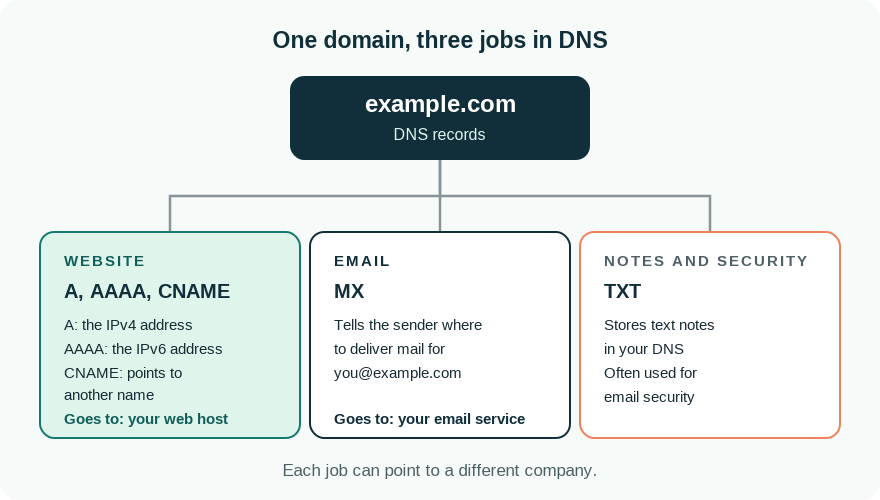
Changing or deleting a DNS record affects how your domain reaches a website or email service. Before you switch nameservers, write down your current MX and TXT records. Add them again in the new DNS settings if your email should keep working.
One company or two
Same company or separate companies?
Both setups are normal. Neither is always better. The table shows what changes.
| Question | One company for both | Separate companies |
|---|---|---|
| Logins and bills | One account, possibly one bill | Two accounts and two bills |
| DNS setup | The company may add the records for you | You copy the host’s details into your DNS settings |
| Changing hosts later | Possible, but the domain and the old plan sit in one account | Change the DNS records; the domain does not move |
| Who to ask for help | One company to contact | The registrar for the domain, the host for the site |
What stays the same in both setups
- You must renew the domain yourself, or keep auto-renew working.
- Your contact details must stay correct.
- The same ICANN transfer and expiry rules apply.
Still choosing a plan? Compare the best web hosting for beginners or the best web hosting for small business.
Switching
Moving to a new host without moving your domain.
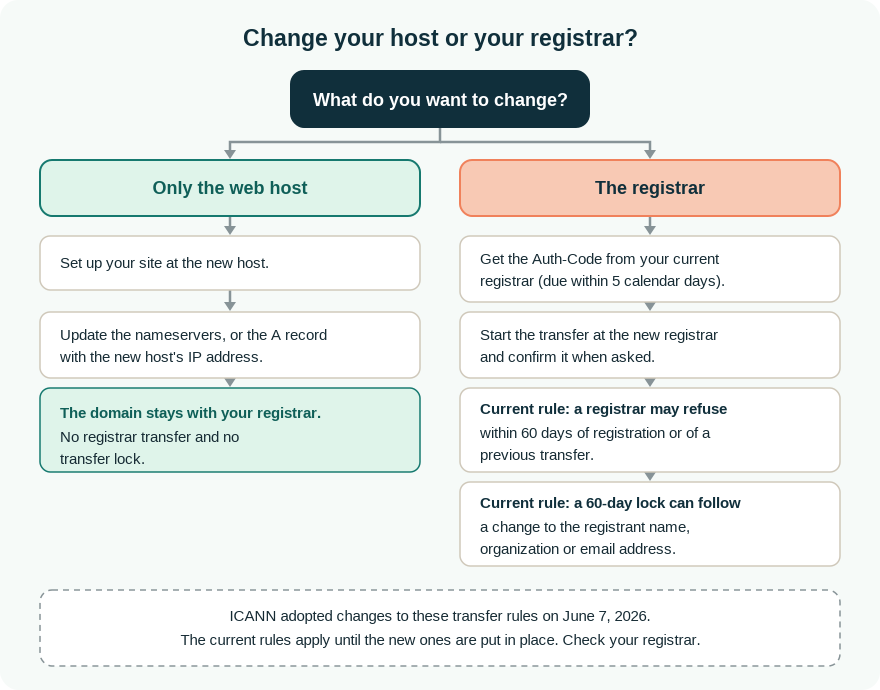
Changing hosts and changing registrars are two different jobs. ICANN notes that you may be able to change web hosts instead of registrars. That avoids the transfer between registrars, and its lock, completely. You update the domain’s nameservers or change the hosting IP address in DNS.
- 01
Set up your site at the new host. Check that it works there first.
- 02
Get the new details. The new host gives you nameservers or an IP address.
- 03
Change them in your DNS settings. Keep your MX records if email stays where it is.
- 04
Keep the old plan for a short while. Some DNS servers may still use a saved old answer until they refresh.
For every step in order, including email and HTTPS, read how to move a website to a new host.
If you do want a new registrar
You have the right to move a domain to another registrar. You start at the new registrar. You will need an Auth-Code, also called a transfer code. Your current registrar must give it to you within five calendar days of your request.
Under the current ICANN rules:
- A registrar may refuse a transfer within 60 days of the first registration.
- A registrar may refuse a transfer within 60 days of a previous transfer.
- After a change to the registrant’s name, organization or email address, a 60-day lock blocks transfers to another registrar. A registrar may let you opt out of this lock beforehand, but it does not have to.
- A registrar may charge a transfer fee, but it cannot refuse the transfer because that fee is unpaid.
ICANN’s tip: if you plan to transfer, do it before you change your contact details. Then the 60-day lock does not get in the way.
These rules are changing. On June 7, 2026, the ICANN Board adopted 47 recommendations for a revised Transfer Policy and told ICANN to put them into practice. The decision does not give a start date. The current published rules apply until the new ones are in place, so check your registrar’s current rules before you transfer.
Renewals
What happens if your domain expires.
Your website and your email both depend on the domain. If it expires, both can stop working, even when the hosting is paid. For endings like .com, ICANN sets these minimum steps:
- 01
Before expiry. Your registrar must send at least two reminders: about one month before and about one week before. They go to the registrant email address in the domain’s contact details.
- 02
Just after expiry. The registrar may offer an Auto Renew Grace Period of 1 to 45 days. You can renew then, but it may cost a fee. Depending on the registrar’s terms, someone else may be able to register the name, or it may be auctioned.
- 03
Before deletion. The registrar must disrupt the domain’s DNS for up to 8 days before it deletes the name. Your website and email stop working. This is meant as a last warning.
- 04
After deletion. If the registrar deletes the domain, it must send at least one more notice within 5 days after expiry. The registry must then offer a 30-day Redemption Grace Period. You can ask your registrar to restore the domain, but it may charge a fee.
Renew well before the expiry date. Keep the registrant email address one you actually read. A reminder sent to an old inbox does not help.
Before you pay
A short checklist before you buy.
- 01
Who is the registrant? The registrant holds the rights to the name. Make sure that is you or your business.
- 02
Which email gets the reminders? Renewal notices go to the registrant email address. Use one you check.
- 03
What does renewal cost? Registrars must show renewal, late-renewal and restore fees. If a domain comes with a hosting plan, check whether that is only for the first year.
- 04
Is auto-renew on? If so, keep your payment details current.
- 05
Can you reach the DNS settings? You need them to point the domain at a host and to set up email.
- 06
Where will email run? Note which company your MX records point to.
Sources and limits
Check the rules at the source.
- ICANN: registrants’ benefits and responsibilities
- ICANN: the domain name registration process
- ICANN: FAQs for registrants on transferring a domain
- ICANN: 5 things about the Expired Registration Recovery Policy
- ICANN: Transfer Policy (current text)
- ICANN Board: approved resolutions, June 7, 2026
- Google Workspace Admin Help: set up MX records
- Squarespace Help: edit your domain’s DNS records
- Cloudflare Learning: DNS server types
- Cloudflare Learning: DNS records
Sources checked October 19, 2026. We did not test any registrar or host. The Google and Squarespace pages are used only to explain DNS, not as recommendations. Rules and prices change; check your registrar’s current terms.
Straight answers
Domain and hosting questions.
Can I own a domain without hosting?
Yes. You can register a domain without pointing it at a website. You still have to renew it to keep it. To show a website at that address later, you need hosting.
Does buying a domain include hosting?
Not by itself. A domain registration gives you the name. Some companies also sell hosting, sometimes in one package, so check what the plan actually lists.
Can I host my website without a domain?
A server can be reached by its IP address, because that is what DNS looks up. But a name is far easier for people to remember and type, so a public site normally has one.
Is a registrar the same as a web host?
No. A registrar registers domain names. A web host runs websites. Some companies do both, and resellers may sell domains next to hosting. ICANN’s lookup tool shows which registrar holds a domain.
Can I run my website without hosting?
A public website needs a server to run on. That can be a hosting plan, a website builder that includes hosting, or a server you manage yourself.
Can I keep my domain if I change hosts?
Yes. Update the nameservers or the IP address in your DNS settings. The domain stays with your registrar, so no registrar transfer is needed.