The useful answer
Most small businesses should buy less server work, not more.
Choose a service that already handles the server when your team only needs to edit pages, collect leads, take bookings, or sell products. A VPS is not an upgrade when nobody will update, watch, back up, and recover it.
Write this down first
Seven facts turn a vague “best” search into a real choice.
Do not start with a traffic guess. A new local business may have few visitors but still needs a working contact form, safe staff access, and a clear recovery plan.
Four sensible routes
Match the host to the way the business site is built.
Hosted website builder
- May fit
- A service business that wants to edit pages, forms, and opening hours without caring for a server.
- Work split
- The builder hosts the site. You still manage the domain, pages, users, and any paid add-ons.
- Check
- Can you export the content, connect your domain, add forms, and move away later?
Managed WordPress hosting
- May fit
- A content-heavy site that needs WordPress themes, add-ons, or a team that already knows WordPress.
- Work split
- The host manages the main server. Your team still updates the site, checks add-ons, and tests backups.
- Check
- Which WordPress updates, backups, restores, and security jobs are included in writing?
Static hosting
- May fit
- A fast brochure site made from ready-to-show files by a developer or site-building tool.
- Work split
- The host serves the files. Forms, editing, and other changing features may use separate services.
- Check
- Who can publish changes, where form messages go, and how the last good version is restored?
Hosted ecommerce platform
- May fit
- A store that needs products, checkout, orders, and payments in one system.
- Work split
- The platform hosts the store. You manage products, taxes, shipping, staff access, and store settings.
- Check
- Payment fees, app costs, product limits, exports, and what happens when you cancel.
See how these routes work:Read the hosting-type guide
See the real provider pages
Three providers that match three different business jobs.
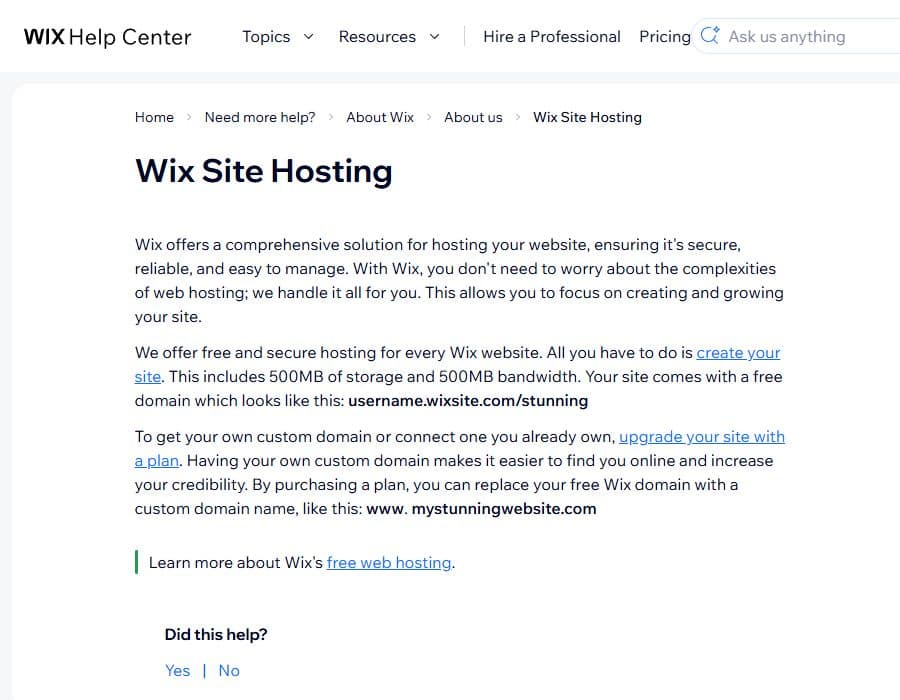
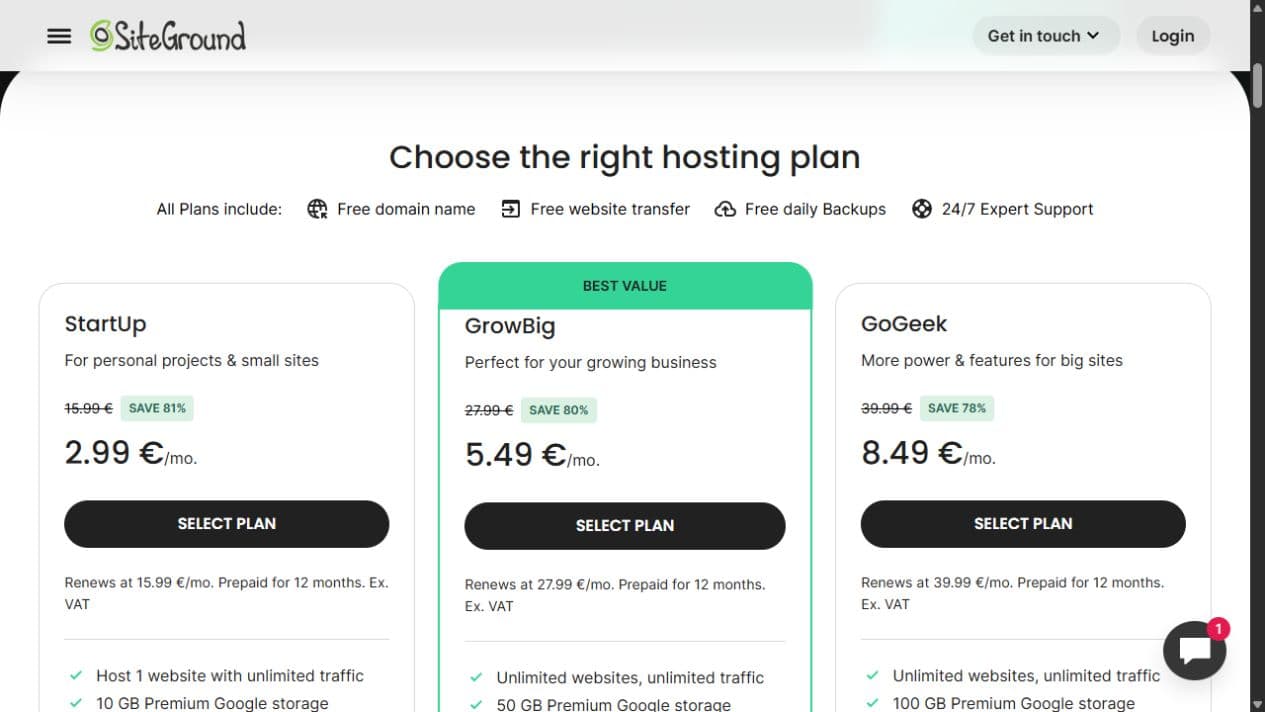
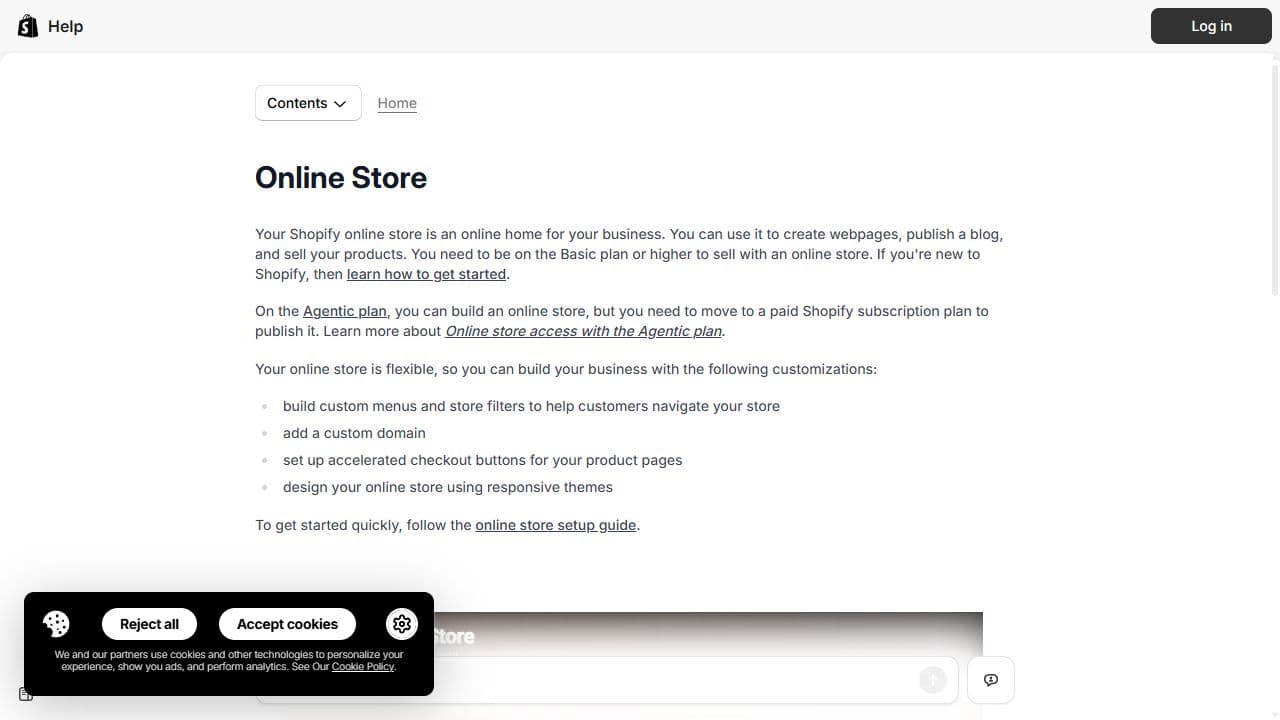
These are examples, not winners. Wix shows the all-in-one builder route, SiteGround shows managed WordPress plans, and Shopify shows the hosted-store route. Use the screenshot to learn what to look for, then open the current provider page before making a choice.
Wix website hosting
What you can check here
- Wix says hosting is included with every Wix website.
- A free site uses a Wix address; a custom domain needs a paid plan.
- Check the live plan for today’s storage, bandwidth, price, and renewal rules.
SiteGround WordPress hosting
What you can check here
- The plan cards separate the first offer from the renewal price.
- Website and storage limits change between plans.
- Confirm which backups, restores, updates, and support jobs are included.
Shopify online store
What you can check here
- Shopify describes the online store as the online home for a business.
- The guide covers pages, products, a custom domain, checkout, and themes.
- Check the current plan, payment fees, app costs, shipping tools, and export options.
Quick decision table
Start with the row that sounds most like your business.
| Your main need | Start with | Why |
|---|---|---|
| Services, about page, contact form | Hosted website builder | Editing and hosting stay in one service. |
| Regular articles and WordPress add-ons | Managed WordPress | The plan is made to run WordPress while the host handles the main server. |
| Developer-built brochure site | Static hosting | It serves ready-made files without a full server for you to manage. |
| Products, checkout, orders, shipping | Hosted ecommerce platform | The store tools and hosting are one system. |
| A custom app with special server needs | Managed app platform first | It can run code while removing some server work. |
Before checkout
Check the full service, not the large sale number.
- 01
The full first payment. A low monthly number may require one, two, or four years paid in advance.
- 02
The renewal price. Write down the later price and the date it starts.
- 03
Business email. Website hosting does not always include email for your domain.
- 04
Forms and bookings. Check where customer details go and who can read them.
- 05
Backups and restores. A backup matters only when somebody can restore it.
- 06
Staff access. Each person should have their own login and only the access they need.
- 07
Support boundaries. Find what support will fix and what stays your job.
- 08
Moving out. Check how to take the domain, pages, products, contacts, and files with you.
Keep an exit door
Your domain and business records should not be trapped.
Before you build, ask how to export pages, products, contacts, orders, images, and form entries. Keep the domain in an account the business controls. Keep a separate copy of important files. A site backup does not always include email or domain settings.
Sources and limits
What the official guides confirm.
We checked these official pages on August 28, 2026. They confirm how each product type works. They do not prove speed, support quality, uptime, or which company is best for your business.
- Wix site-hosting guide — Wix says hosting is included with a Wix site.
- Squarespace hosting guide — Squarespace says its site plans include hosting and bandwidth.
- WordPress hosting guide — WordPress explains normal and WordPress-specific hosting.
- Cloudflare Pages overview — Cloudflare documents Git and direct-upload routes for ready-made files.
- Shopify online-store guide — Shopify documents pages, products, checkout, and store tools in one service.
FAQ
What is the best web hosting for a small business?
For a simple service site, start with a hosted website builder. Use managed WordPress when WordPress features matter. Use static hosting for a coded brochure site. Use a hosted ecommerce platform when the main job is selling online.
Does a small business need a VPS?
Usually not for a normal website. A VPS adds server updates, access rules, monitoring, backups, and recovery work. Choose it only when a simpler service cannot run what you need and a named person will manage the server.
Is business email included with web hosting?
Sometimes, but not always. Check email as a separate line. Find the number of mailboxes, storage, spam protection, renewal price, and how you can move old mail later.
Should I choose the cheapest small-business hosting?
Choose the smallest plan that can do the full job. Compare the total paid today, renewal, limits, backups, support, and moving costs. A cheap first term can become expensive when key features need paid add-ons.
Did you test or rank hosting companies?
No. This page helps you choose a hosting type and gives you checks for a real plan. It does not claim that one company is fastest, safest, or best for every business.